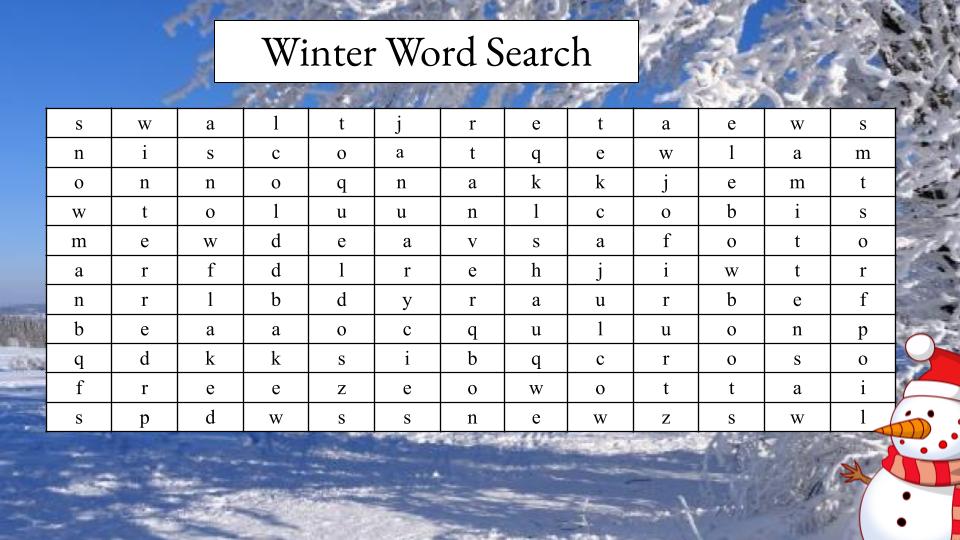
This week we focused on multimedia images. I have not thought about using powerpoint or google slides for this. When it comes to making things look nice Canva is usually my go to. I think one of the hardest parts of designing things is finding images I like that are not copyright. I decided I would try to do an intro to my blog with a photo of me that that I took myself but formatting this in a way that did not look completely ridiculous I felt challenging. I decided to look at one of the power point guides from google slides and I noticed there was a section on how to make word searches. I absolutely love word searches. I made them everyday as a starting activity for the students I tutored and a few times for the students in my L2P class. They are super fun for kids but hard to think of on the spot and hard to properly format on a white board so I think using google slides or Powerpoint is a great idea and something I can do as a teacher and in my practicum to make my life either. The snow this weekend inspired me to make a winter themed crossword if you want to try it please do! On google slides I picked the images provided to me to make sure there were no copyright issues. I layered a picture of a snowy outdoor area behind me word search and added an adorable snowman in the bottom corner. I think it looks cute but you can tell I don’t have a background in graphic design. Let me know if you have any aesthetic suggestions and comment to let me know how the word search goes for you!
Words to find
- Snowman
- Snowflake
- Winter
- Freeze
- Frost
- Sweater
- February
- January
- Toque
- Jacket
- Blanket
- Coat
- Boots
- Icy
- Mittens